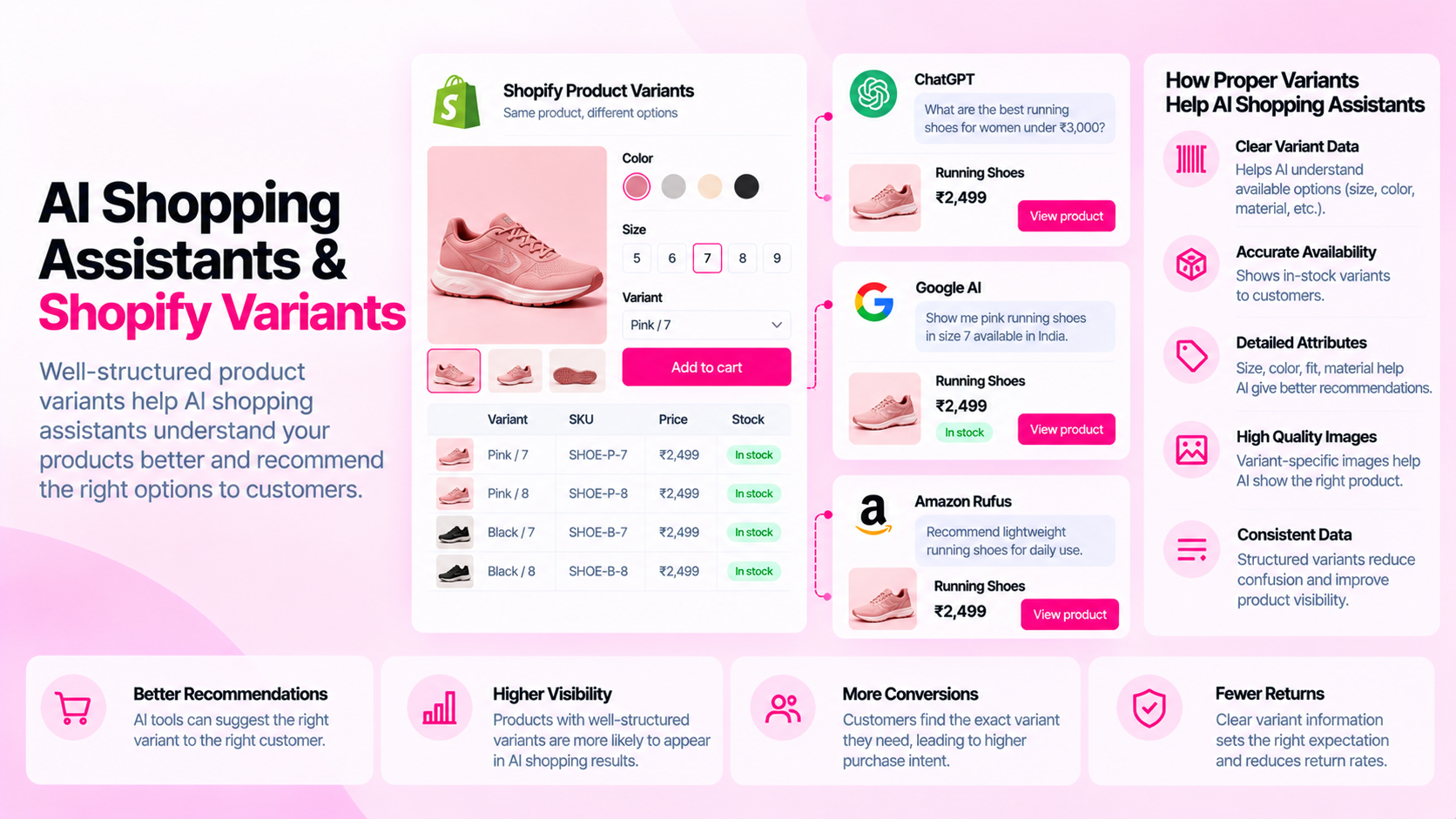
Quick Answer: How Can You Make Shopify Product Variants Easier to Understand?
Keep variant options, availability, images, prices, and product specifications accurate and consistent. Check how the selected variant is represented on the storefront and in relevant data outputs. Different AI systems have different access methods and interpretation capabilities — no single setup guarantees correct recognition by every system.
Why Variant Data Is Easy to Misinterpret
A single product might have 24 combinations: 4 sizes × 3 colors × 2 materials. Each combination has:
- Its own price (potentially)
- Its own inventory and availability
- Its own images (ideally)
- Its own variant ID in the Shopify Admin
When a shopper selects a specific variant on the product page, Shopify updates the visible content to reflect that selection. But this client-side update depends on JavaScript — and not every system that reads your product page renders JavaScript the same way.
A simplified search crawl, an AI assistant pulling product information from the page source, or a feed integration pulling from cached data may see a different state of the product than a shopper interacting with the live page. This creates the potential for a mismatch between what you intend to show and what these systems interpret.
Keep Variant Labels Clear
The starting point is accurate, specific variant option names:
| Less clear | More specific |
|---|---|
| "Color: Option 1" | "Color: Deep Navy" |
| "Size: S" | "Size: S (fits UK 8–10)" |
| "Material: Type A" | "Material: 100% Merino Wool" |
| "Model: Standard" | "Model: Standard (up to 50L)" |
Ambiguous option labels create confusion for shoppers and for systems that read them. If a variant option name doesn't tell you what the variant actually is, it won't tell any other system either.
Align Images, Price, and Availability With the Selected Variant
For each variant combination, verify:
- Images: Does selecting "Forest Green" update the displayed image to the green version? If the image doesn't change, the image for "Forest Green" may not be assigned to that variant in Shopify Admin.
- Price: Does the price update correctly when a different size or configuration is selected? Variant-specific pricing is set in Shopify Admin — confirm it's correct for each variant.
- Availability: Does "Out of stock" appear for unavailable variants? Shopify can automatically show availability based on inventory settings, but verify the behavior on the live storefront.
- URL: When a variant is selected, does the URL update to include the variant parameter (
?variant=VARIANTID)? This makes the selected variant linkable and shareable, and it's the URL that appears in feeds and structured data for that specific variant.
Test this for at least one product per major product type in your store.
Represent Category-Specific Specifications Clearly
Beyond variant options, product specifications need to be visible on the product page — not just stored in metafields that aren't rendered:
| Product type | Specifications that matter |
|---|---|
| Apparel | Fabric composition, care instructions, fit notes, size guide |
| Footwear | Size scale (EU/UK/US), width, true-to-size guidance |
| Electronics accessories | Compatible device models, OS versions, connector types |
| Beauty | Key ingredients, skin type suitability, usage instructions |
| Home goods | Dimensions, weight capacity, assembly requirements |
These specifications help shoppers make decisions. They also provide the factual content that search engines and AI systems can extract from your page. Specifications buried in an admin-only metafield that isn't rendered on the storefront don't help anyone.
Test the Actual Storefront
The most reliable way to verify variant behavior is to test it like a shopper would:
- Navigate to the product page in a browser
- Select each major variant combination and confirm the image, price, and availability update correctly
- Check whether the URL includes the
?variant=parameter after selection - View the page source and search for
application/ld+json— verify the structured data reflects the correct product information - On mobile, repeat the test for your most complex product (the one with the most variant combinations)
For the technical layer, Google's Rich Results Test can validate whether the structured data on a specific product URL is parseable and correct.
What AI Systems Can and Cannot Do
It's worth being specific about what AI shopping assistants can realistically do with your product data:
- Can read static page content: Text that's in the HTML when the page loads, before JavaScript runs
- May read structured data: JSON-LD in the
<head>can be read without rendering the page - May use feed data: Some AI systems pull product data from submitted product feeds (Google Merchant Center, Meta Catalog) rather than directly crawling pages
- Typically cannot interact with the page: Selecting a variant, clicking buttons, or triggering JavaScript-driven content changes is generally not part of how crawlers work
This means the variant state your shopper sees after clicking "Size: Large" may not be what a crawler or AI system reads. The static page content (what's in the HTML before JavaScript updates it) and the structured data are the most reliably readable layers.
Frequently Asked Questions
Can every AI assistant access every product variant? No. Access methods vary — some read static HTML, some process structured data, some use product feeds, some use JavaScript rendering. There is no guarantee that variant-specific information will be correctly read by every system.
Does Product JSON-LD solve every variant problem? No. JSON-LD can provide structured product information for a specific URL. But if the canonical URL for your product doesn't include variant-specific data, and if variant URLs aren't submitted or linked, variant details may not be captured in the structured data that systems read.
Does variant clarity guarantee AI recommendations? No. Clear, accurate product data improves the quality of information available to AI systems, but inclusion in recommendations depends on many factors beyond data quality — platform policies, relevance signals, subscription status, and the specific system's methodology.
What's the minimum to get right? Accurate variant labels, correct image assignment per variant, accurate pricing and availability for each combination, and at least one well-structured JSON-LD block on the product page covering the product's key attributes. That's a reliable foundation.
Related Articles
- Shopify Product Variants and SEO: Duplicate URLs and Canonical Tags
- Why AI Shopping Tools May Misinterpret Incomplete Product Specifications
- How to Structure Product Attributes for Accurate Product Comparisons