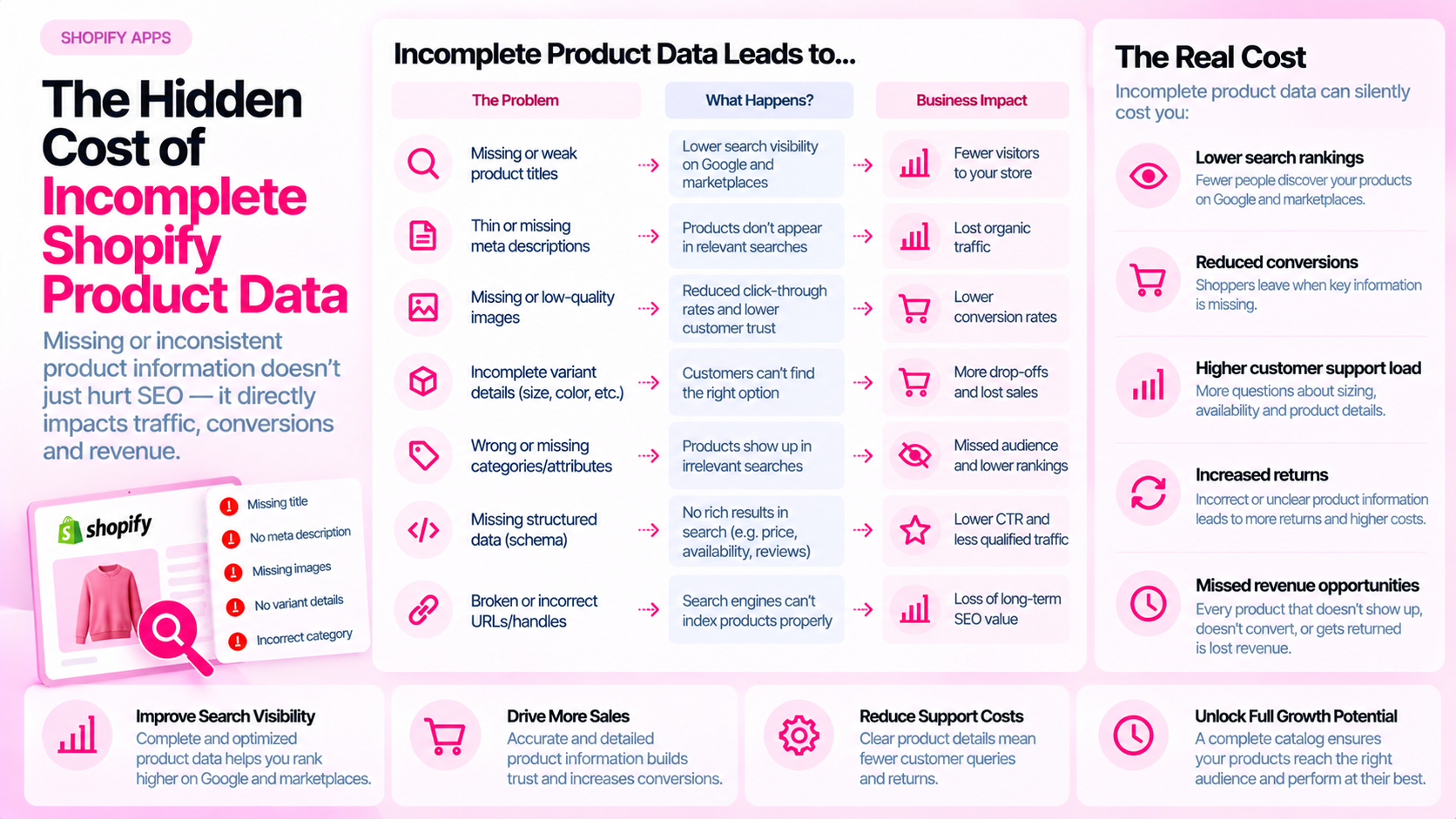
Quick Answer: What Does Incomplete Product Data Cost a Shopify Store?
The impact depends on the type of missing information and the products affected. Incomplete data creates extra support work, inconsistent merchandising, feed errors, confusing product pages, and repeated manual corrections. Rather than citing a generic percentage, measure these effects using your own store data.
Where Incomplete Data Creates Work
Missing or wrong product information doesn't sit quietly — it surfaces repeatedly across your team:
- Support tickets: Customers ask about sizing, materials, compatibility, or care instructions that should be answered on the product page. Each ticket is a measurable cost.
- Manual corrections: A supplier feed imports products without descriptions; someone has to write them. A batch import populates the wrong category attribute; someone has to fix it.
- Feed rejections: Google Merchant Center and Meta Catalog both reject or limit products with incomplete required attributes. Fixing disapprovals takes time that compounds when the root cause isn't addressed.
- Returns and complaints: A product with an inaccurate size chart or material description can lead to returns that are preventable with correct information.
- Inconsistent merchandising: When the same attribute (e.g., "100% cotton") appears as a metafield on some products and in the description body on others, downstream systems — feeds, comparisons, search filters — may behave inconsistently.
Build an Inventory of Data Gaps
Before you can estimate cost, you need to know what's missing. A structured inventory covers:
| Field category | What to check |
|---|---|
| Titles | Missing, too short, or inconsistently formatted |
| Descriptions | Empty, duplicated across products, or lacking key details |
| Images | Missing, no alt text, or not updated for current variants |
| Attributes | Missing category-specific fields (material, dimensions, fit, etc.) |
| Metafields | Defined but unpopulated, or inconsistent values across similar products |
| Metadata | Missing or auto-generated meta descriptions that don't reflect the product |
| Variant details | Incorrect prices, wrong availability, images not tied to the right variant |
| Feed values | Storefront data doesn't match what's in the product feed |
Separate confirmed data gaps from suspected downstream effects. Fixing a missing attribute will not automatically fix every downstream problem — but it removes the root cause.
Estimate Operational Cost Using Your Own Data
A structured estimate is more useful than a generic benchmark. Track:
- Hours per month: How long does your team spend finding and correcting product data issues?
- Repeat support contacts: For issues that can be traced to missing or wrong product information, count how many contacts are involved.
- Rework incidents: How often are products published with errors and then corrected after discovery?
- Feed disapprovals: How many products are currently disapproved or limited in Merchant Center, and what's the correction timeline?
Record your assumptions and avoid double-counting (e.g., don't count both the correction time and the publishing workflow time for the same task). The goal is a directional cost estimate, not a precise figure.
Connect Data Quality to Customer Clarity
Some gaps matter more than others for customer experience. Focus your attention on information that affects purchase decisions:
- Sizing and fit: Missing size guides or inaccurate measurements cause hesitation and returns.
- Compatibility: For accessories, parts, or tech products, missing compatibility information is a direct conversion blocker.
- Material and care: Especially relevant for apparel, beauty, and home goods.
- Availability: A product shown as "in stock" in a feed when it's actually out of stock leads to customer frustration and wasted ad spend.
Use customer feedback, support ticket categories, and return reasons to identify which missing fields are causing the most friction.
Create a Remediation Plan
Once you have an inventory and a rough cost estimate:
- Prioritize inaccurate essential information first — wrong size charts, incorrect prices, missing availability
- Then address broad recurring issues — missing meta descriptions across an entire collection, images without alt text across a product type
- Assign owners — content team for copy, technical team for structured data, merchandising for specifications
- Verify corrections — rescan or manually check that the fix is actually live on the storefront and in the feed
Avoid treating audit closure as equivalent to resolved issues. Track the status of corrections, not just findings.
Frequently Asked Questions
Can incomplete data reduce conversions? It can create friction at the decision point — a shopper who can't find a size guide may not complete the purchase. The size of the effect depends on the product, category, and how much the missing information matters for that buying decision. Measure this for your store rather than assuming a universal rate.
How can I calculate the cost? Track staff time spent on corrections, rework incidents, measurable support volume tied to missing information, and feed disapproval rates. Build a monthly estimate using these inputs and refine it as you gather more data.
Does fixing every field improve rankings? Not directly. Completing required fields removes friction and improves feed eligibility, but SEO outcomes depend on many factors. Prioritize based on what creates operational cost or customer friction, not on assumptions about ranking gains.
Related Articles
- Shopify Product Data Quality: 12 Errors That Accumulate as Your Catalog Grows
- How to Maintain Product Data Quality When Multiple Teams Update Your Shopify Store
- How to Prioritize Product SEO Fixes Across a Large Shopify Catalog