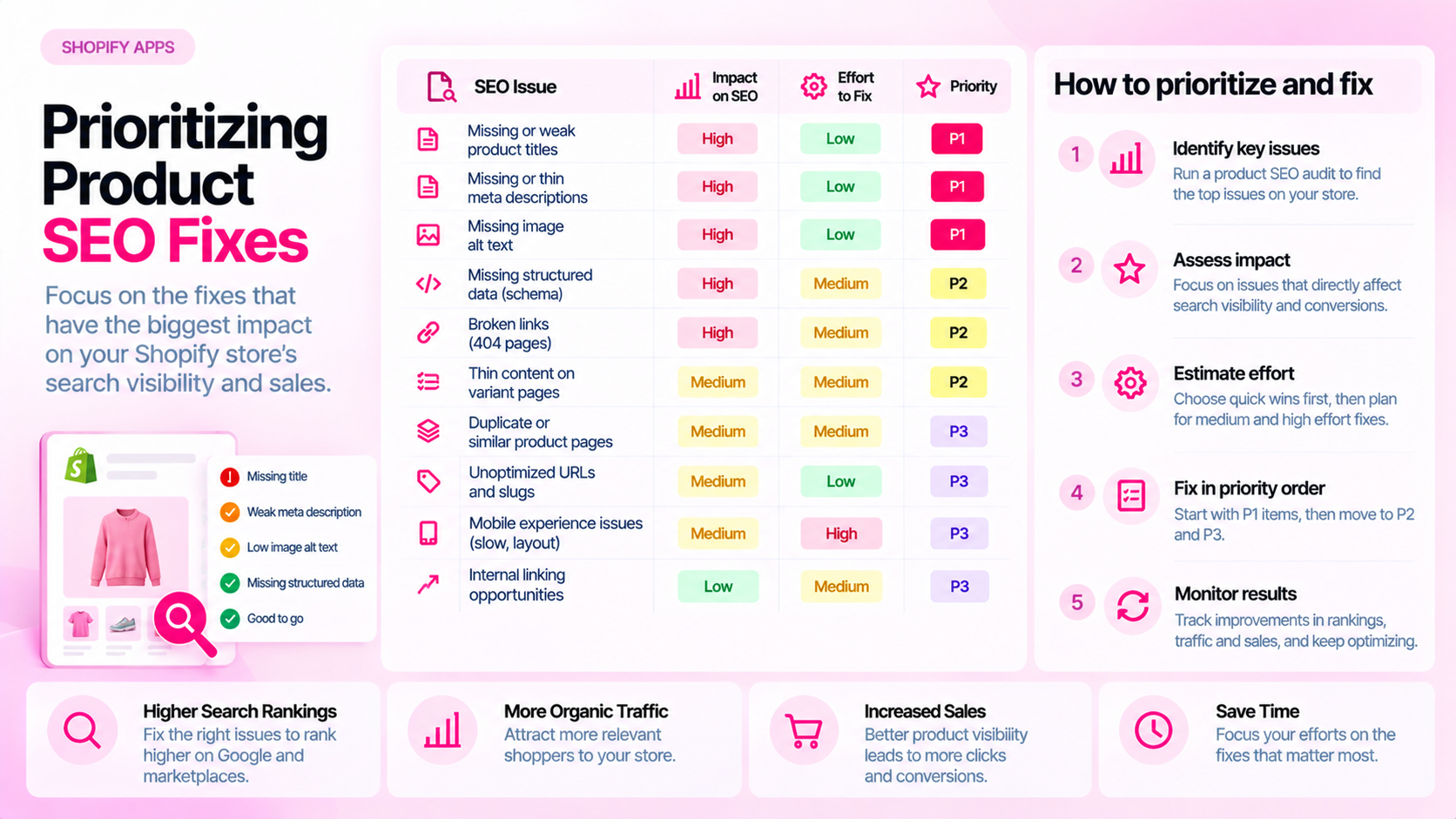
Quick Answer: How Should You Prioritize Shopify Product SEO Fixes?
Rank issues by severity, number of affected products, business relevance, and confidence in the diagnosis. Fix blockers and widespread inaccuracies first, then batch recurring metadata and content issues. Avoid treating every flagged item as equally urgent — a list of 400 issues requires triage, not a single queue.
Why Issue Counts Alone Are Not Enough
An audit tool might surface 400 flagged items. That number tells you almost nothing about what to fix first.
Ten issues on your top 10 revenue-generating product pages may matter far more than 200 missing alt text values on discontinued variants that get no organic traffic. A canonical tag pointing to the wrong URL on a high-priority collection page is a blocker; a meta description that's 165 characters instead of 160 is not.
Prioritization is about directing limited time toward fixes that reduce the most risk or create the most improvement — not mechanically closing every line item.
Use a Four-Factor Framework
Evaluate each issue category against these four dimensions:
- Severity: Is this preventing the page from functioning, ranking, or being indexed? Or is it a quality improvement?
- Scope: How many products are affected? A single issue on 500 products is different from 500 isolated issues on 500 different products.
- Business relevance: Which products or collections matter most by revenue, margin, search demand, or strategic importance?
- Confidence: Is the diagnosis confirmed, or is it a potential issue that needs manual verification first?
Build a Practical Priority Matrix
Use this as a starting framework and adjust it to the store's actual situation:
| Priority level | Criteria | Example |
|---|---|---|
| Critical | Blocks indexing, serving, or causes inaccurate information | Important pages returning 404s; canonical pointing to wrong URL causing page to be deindexed; incorrect price shown |
| High | Missing essential information across a key collection | All products in a top category missing meta descriptions; main product images missing across a new line |
| Medium | Recurring quality gaps in secondary fields | Alt text missing on secondary variant images; meta descriptions auto-generated from first sentence of description |
| Low | Minor inconsistencies with limited business impact | Title capitalization inconsistencies; description formatting differences between two similar product types |
This is not a fixed rulebook. A "low" issue on a product that generates 40% of revenue becomes high-priority by relevance.
Batch Similar Fixes Carefully
Batching similar issues is efficient — but only if the issue and the fix are actually consistent across the batch:
- Group by field and product type: All missing alt text on apparel images may share the same fix pattern. All missing meta descriptions in a specific collection may be approachable together.
- Verify a representative sample first: Pick 5–10 products from the batch. Confirm the issue, apply the fix, verify on the live storefront. Then scale.
- Use bulk editing tools carefully: Shopify's bulk editor and CSV import are powerful but unforgiving. A misapplied bulk edit can introduce new errors across hundreds of products.
- Keep a record: Note what was changed, when, and who changed it. If something breaks, you need an audit trail.
Measure Resolution, Not Just Detection
Closing a ticket in a spreadsheet is not the same as confirming the fix is live. For each batch of fixes:
- Re-scan the affected products to confirm the field is now populated
- Check the rendered page (not just Shopify Admin) for fields that depend on theme rendering
- For structured data, use Google's Rich Results Test or URL Inspection in Search Console
- For canonical tags, check the actual
<head>of the rendered page
Track completion against the original scope of affected products, not just a "done" checkbox.
What Not to Track as SEO Success
Avoid treating issue closure as proof of ranking gains. A fixed meta description doesn't guarantee a higher click-through rate. A corrected canonical doesn't guarantee the page will outrank competitors.
Track audit resolution separately from search performance. If search performance improves after a round of fixes, that's useful signal — but it may have multiple causes. If it doesn't, the fixes were still worth doing; they removed technical risk even if the lift isn't immediately visible.
Frequently Asked Questions
What should be fixed first? Confirmed blockers (indexing failures, broken redirects, incorrect canonical on high-priority pages) and inaccurate essential information (wrong prices, incorrect availability). These carry the highest risk of direct harm to users or business outcomes.
Should all missing metadata be treated as critical? No. A missing meta description on a product that gets no organic traffic is not the same as a missing meta description on your best-selling product. Context — traffic, revenue, search demand — should influence priority.
How do you measure audit success? Track the number of affected products with confirmed resolutions versus the original scope. Monitor whether recurring issue types decrease over time, which suggests the root cause (workflow or template) has been addressed. Keep search performance monitoring separate from audit completion metrics.
How long should prioritization take? You should be able to assign rough priorities to your major issue categories in an hour or two with the right data. Avoid spending weeks in planning when the highest-priority fixes are obvious. Start fixing; refine the priority list as you learn more.
Related Articles
- How to Audit 1,000 Shopify Product Pages Without Checking Them Manually
- The Shopify Product SEO Audit Checklist: 25 Things to Check Before Launch
- Shopify Product Data Quality: 12 Errors That Accumulate as Your Catalog Grows
Use CatalogAI to identify and organize Shopify catalog issues