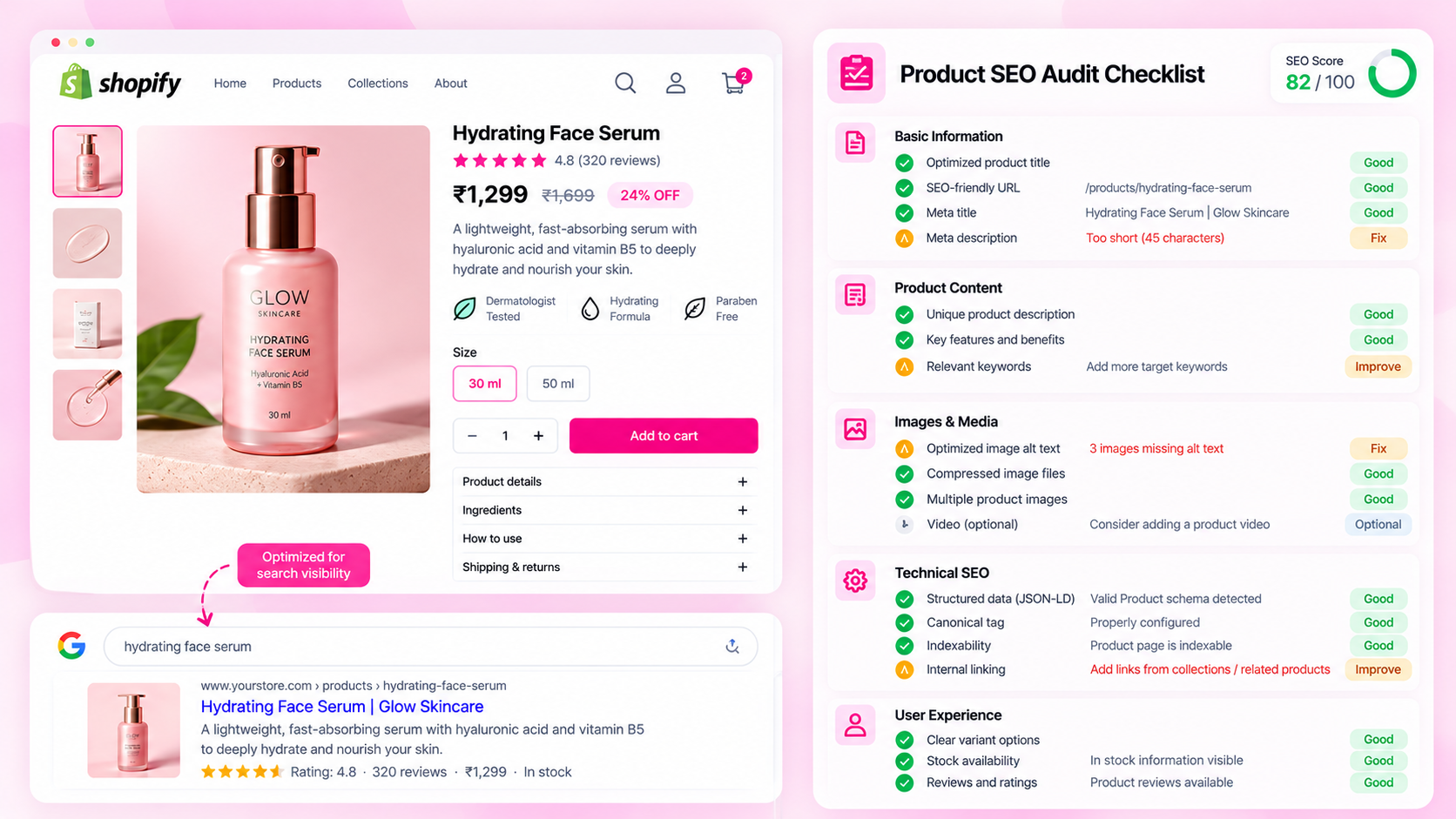
Quick Answer: What Should a Shopify Product SEO Checklist Include?
Review product content (titles, descriptions, specifications), SEO metadata, images and alt text, internal links, Product structured data, canonical URLs, indexability, and mobile usability. Then validate the live storefront after publishing — not just the backend fields.
Why a Checklist Matters at Launch
A Shopify product page involves more moving parts than it appears. The backend fields (title, description, SEO fields) are just the starting point. The final page depends on how the theme renders those fields, what apps add to the page, and what the storefront delivers to a browser and to a search engine crawler.
Problems that are easy to catch before launch become harder to fix after a product is live and indexed. A pre-launch checklist applied consistently across every product — not just high-priority SKUs — reduces the risk of systematic issues that only show up weeks later in Search Console.
Section 1: Product Content (Checks 1–7)
1. Product title is specific and descriptive. Avoid vague titles like "Blue T-Shirt." Include relevant identifiers — brand, material, size range, style — based on what shoppers actually search for in your category.
2. Description includes essential specifications. For apparel: material, fit, care. For electronics: compatibility, specifications, what's in the box. For food: ingredients, allergens, volume. Descriptions that only repeat the title or contain marketing copy without useful information are a missed opportunity.
3. Category-specific attributes are present. If your store uses metafields or product attributes for structured specifications, make sure they are populated — not left blank. A skincare product missing skin type or volume cannot compete with competitors whose product pages answer those questions clearly.
4. Product information is factually accurate. Verify dimensions, materials, weights, and compatibility claims against the actual product before publishing. Inaccurate specifications create returns, negative reviews, and customer support load.
5. Similar products have meaningfully distinct copy where relevant. Near-identical descriptions across a product range can reduce the quality signal of individual pages. Where products genuinely differ, those differences should be reflected in the copy.
6. All claims are supportable. Avoid superlatives and unverifiable claims ("best in the world," "guaranteed results") that could also create policy or advertising compliance issues.
7. Variant availability and details are clear. If a size is out of stock, that should be visible. If a colour variant has a price difference, that should be clear. Ambiguity at the variant selection stage is a conversion problem as well as a data accuracy issue.
Section 2: Metadata (Checks 8–11)
8. SEO title is present and meaningful. Shopify uses the product title as the SEO title by default. Override it when the default title is too short, too long, or does not reflect how customers search.
9. Meta description is relevant and specific. A useful meta description summarises what the product is and why it matters — in one or two sentences. Search engines may not always use it, but it is still worth writing accurately. Avoid leaving it empty or copying the beginning of the product description verbatim.
10. Metadata is not duplicated across unrelated products. Mass-applied metadata (e.g., the same meta description template on 200 products) reduces individual page quality. Each product should ideally have a description that reflects its specific offering.
11. Metadata accurately describes the page. Check that the SEO title and description match what is actually on the product page. After a product edit, meta content can become stale.
Section 3: Images (Checks 12–15)
12. Main product image is present and high quality. A product page without a usable main image is incomplete regardless of its text content.
13. Meaningful images have descriptive alt text. Alt text supports accessibility and helps search engines understand image content. Write alt text that describes the specific product and relevant visual detail — not a keyword list, not "image of product."
14. Image file sizes are appropriate. Oversized images slow page load, particularly on mobile. Compress images before upload — Shopify has a size limit, but staying well below it improves performance.
15. Alt text is not keyword-stuffed or generic. "buy cheap blue t-shirt online cotton fabric t-shirt sale" is not alt text — it is spam. Aim for a description a visually impaired customer would find useful.
Section 4: Technical SEO (Checks 16–21)
16. Product page returns HTTP 200. Verify the URL does not return a redirect, 404, or 500 error. This sounds basic but is easy to miss after URL handle changes.
17. Canonical URL is appropriate. Shopify automatically adds canonical tags, but collection-filtered and variant URLs can sometimes produce unexpected canonical targets. Review the canonical on the rendered page.
18. Robots directives are intentional.
Check that the product page is not accidentally blocked by a noindex meta tag or robots.txt entry. This can happen when theme sections or apps add their own directives.
19. Product is reachable through internal links. A product that is only accessible by direct URL is a discovery problem. Confirm it appears in at least one collection, sitemap, or navigable path.
20. Product JSON-LD is valid.
Run a representative product through Google's Rich Results Test. Check that name, image, offers.price, priceCurrency, and availability are all present and match the visible page.
21. Structured data values match the visible page. A product showing £49.99 on the page but £44.99 in the JSON-LD is a mismatch that can cause Search Console warnings and reduce rich result eligibility.
Section 5: Experience and Launch (Checks 22–25)
22. Variant selection works as expected. Test each available variant. Confirm that selecting a size, colour, or configuration updates the price, images, and availability correctly.
23. Mobile layout is usable. Test on a real device or in browser dev tools. Confirm images load correctly, buttons are tappable, and text is readable without horizontal scrolling.
24. Add-to-cart and purchase flow work. Complete a test purchase or checkout for the product. Confirm that the product adds to cart at the correct price with the correct variant selected.
25. Recheck the live page after publishing. Verify the canonical URL, check the page is accessible, confirm structured data is present, and view the page on mobile. Publishing can sometimes surface issues that did not appear in the backend preview.
How to Use This Checklist Efficiently
For a small catalog, run through all 25 checks for every product. For a larger catalog:
| Approach | When to Use |
|---|---|
| Full 25-check review | New products, hero SKUs, pages being relaunched |
| Automated scan for checks 8–21 | Broad catalog quality monitoring using a tool like CatalogAI |
| Spot-check 10% manually | Periodic quality sampling for high-velocity catalogs |
| Template-level review | After theme updates that could affect structured data or canonical tags |
Frequently Asked Questions
How often should I run a Shopify product SEO audit?
After major product launches, after theme updates, after bulk imports, and periodically (monthly or quarterly) for stores whose catalogs change frequently.
Does a pre-launch checklist guarantee rankings?
No. A checklist helps ensure a product page is accurate, complete, and technically sound — all of which support search performance — but rankings depend on many factors including competition, site authority, and search intent.
Can I automate these checks?
Checks 8–21 (metadata, images, technical SEO) are well-suited to automated auditing. Checks 1–7 and 22–25 involve content quality and user experience judgements that benefit from manual review.
Related Articles
- How to Audit 1,000 Shopify Product Pages Without Checking Them Manually
- Shopify Product Schema Errors: How to Find and Fix Missing JSON-LD
- Shopify Image Alt Text at Scale: How to Audit Hundreds of Product Images
- How to Prioritize Product SEO Fixes Across a Large Shopify Catalog