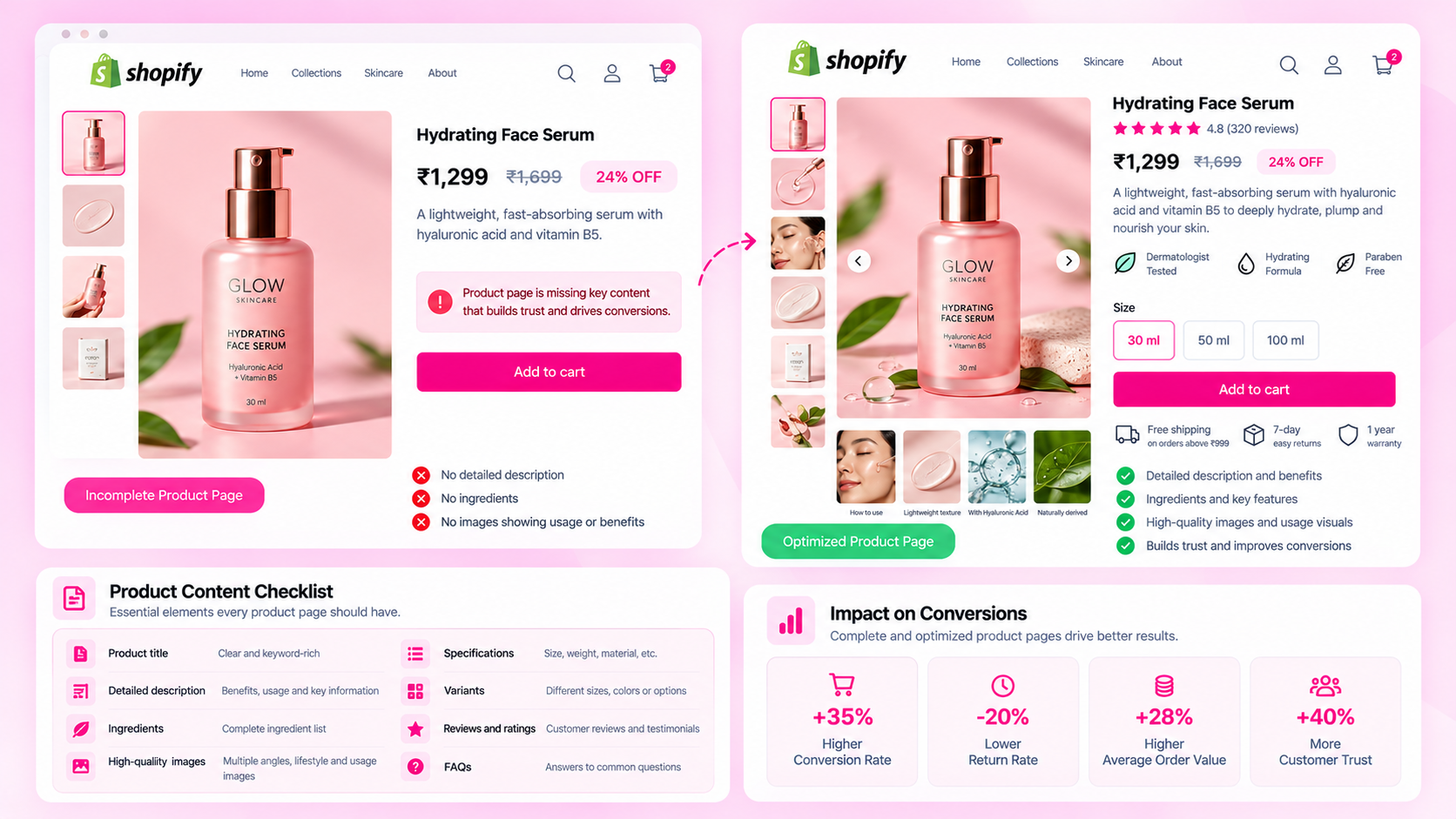
Quick Answer: What Is Shopify Product Data Quality?
Product data quality is the accuracy, completeness, consistency, and usefulness of product information across a store. Audit titles, descriptions, specifications, attributes, images, metadata, and variant details using consistent rules. Most stores accumulate data quality errors gradually — as the catalog grows, through imports, team changes, and platform updates — rather than all at once.
12 Common Product Data Quality Errors
1. Missing or inadequate titles
Titles that are too short, generic, or don't reflect the actual product. "Blue Shirt" tells neither a shopper nor a search engine what the product is. Useful titles include brand, product type, and at least one distinguishing attribute.
2. Vague or duplicated descriptions
Generic copy that applies to any product in the category ("High-quality material, stylish design") or copy pasted directly from the supplier feed without customization. Descriptions that don't answer the shopper's actual questions about the product.
3. Inconsistent naming conventions
One product is "Leather Wallet – Brown", another is "Brown Leather Wallet", and a third is "Wallet / Leather / Tan". This makes filtering, search, and catalog management harder.
4. Missing category-specific attributes
An apparel product without a size guide. A beauty product without ingredient list or skin type suitability. An electronics accessory without compatibility information. These fields vary by category but their absence is a consistent pattern.
5. Conflicting metafield values
The product description says "100% linen" and the metafield for material says "linen blend". One was updated; the other wasn't. The customer sees inconsistent information depending on which field the theme renders.
6. Outdated specifications
A product that changed its formulation, materials, or dimensions — but the description and attributes still reflect the old version. Common in beauty, supplements, and manufactured goods.
7. Duplicate or near-duplicate copy
Two products in the same category with descriptions that are 90% identical, differing only in a color name. This can create thin-content signals on product pages and makes it harder for shoppers to understand the actual differences.
8. Missing image alt text
Product images with no alt text attribute or with generic values like "product image" copied across hundreds of listings. Both cases leave accessibility and machine interpretation unserved.
9. Incorrect variant details
A size "L" variant that is actually configured with the price of "M". An out-of-stock color that still shows as available. A variant image that doesn't update when the shopper selects a specific color option.
10. Inconsistent units
Some products show dimensions in centimeters; others use inches. Some show weight in grams; others in ounces. Without a defined unit convention, shoppers comparing products cannot make accurate comparisons.
11. Metadata that no longer matches the product
A meta description that was written for an earlier version of the product, or that was auto-generated from the first sentence of a description that has since been updated. Neither version is accurate now.
12. Product information that differs between storefront and feeds
The Shopify Admin shows the product in stock; the Google Merchant Center feed still shows it as out of stock because the feed hasn't refreshed. Or a title in the feed doesn't match the product page because a feed app is using a cached version.
Why These Errors Accumulate
None of these errors typically happen all at once. They accumulate:
- Imports and supplier feeds bring in products without complete fields
- Manual edits by multiple team members without clear ownership
- Theme or app changes that break how certain fields render
- Product updates that change one field but not the related ones
- Platform migrations that don't map all fields from the previous system
The source of each error matters because the right fix may be a process change — not just a one-off correction.
Create Product Data Rules
Define what "complete" means for each product type in your store:
- Required fields by category (not the same list for all products)
- Accepted units and naming conventions
- Which fields have a metafield source versus description-body source
- Who is responsible for each field type
- What the pre-publishing checklist requires
Avoid making every attribute mandatory for every product — an apparel spec table is irrelevant on a digital download.
Audit and Prioritize
Not every error needs immediate attention. Group errors by type and affected products:
- Fix inaccuracies that could mislead customers first (wrong price, wrong availability, incorrect material)
- Then address widespread completeness gaps (all products in a category missing meta descriptions)
- Then handle consistency and formatting issues
Maintain Quality Over Time
A one-time audit is not a solution. Quality degrades as the catalog grows and teams change. Build ongoing quality into the workflow:
- A publishing checklist before new products go live
- A periodic scan of the catalog (weekly or monthly depending on change velocity)
- Clear ownership of each field type so corrections go to the right person
- A review step after bulk edits to verify corrections are live
Frequently Asked Questions
What is a product data audit? A systematic review of product information across the catalog — checking for missing, inconsistent, inaccurate, or outdated values across titles, descriptions, attributes, images, metadata, and feeds.
Who owns product data quality? In most teams, responsibility is shared. Merchandising owns specifications and categories; content owns descriptions and alt text; technical teams own structured data and feed mapping. Quality coordination — tracking audit results and ensuring issues get resolved — needs an explicit owner or it falls through the gaps.
Does complete data guarantee SEO performance? No. Completing required fields removes technical risk and improves information quality. It supports reliable page implementation and feed eligibility. Search outcomes depend on many additional factors including content relevance, links, and competition.
Related Articles
- How to Maintain Product Data Quality When Multiple Teams Update Your Shopify Store
- Shopify Metafields vs Product Descriptions: Where Should Product Specifications Live?
- The Hidden Cost of Incomplete Shopify Product Data
- How to Audit 1,000 Shopify Product Pages Without Checking Them Manually