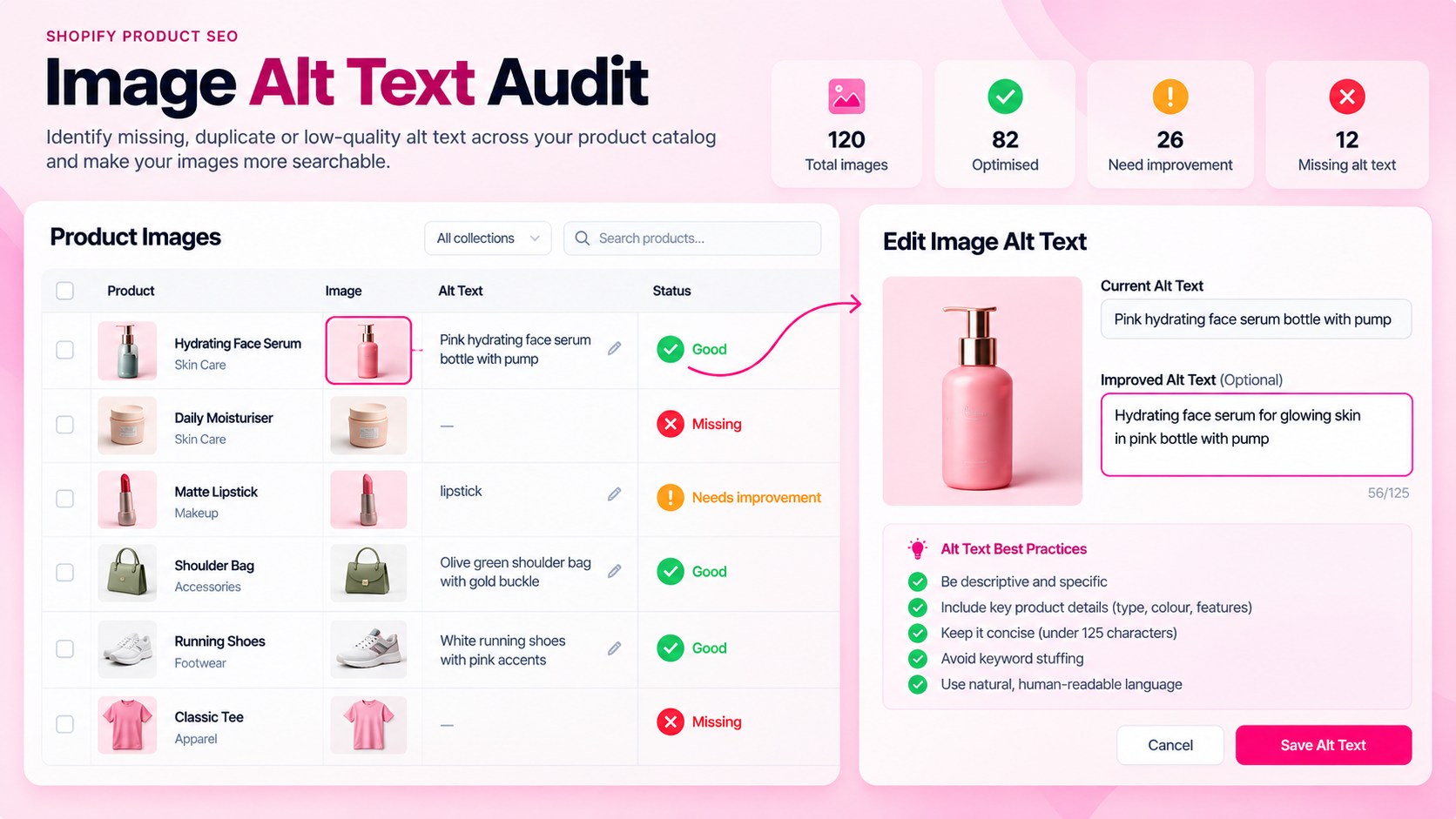
Quick Answer: How Do You Audit Shopify Image Alt Text?
Inventory product images, identify missing or unhelpful alt text, decide which images convey meaningful information, write concise and specific descriptions, and verify the results on the storefront. Alt text serves both accessibility and machine interpretation — neither purpose is well-served by empty fields or repetitive keyword lists.
What Alt Text Does
Alternative text communicates meaningful image content when the image cannot be perceived — for users relying on screen readers, for crawlers parsing page content, and as a fallback when images fail to load.
It is not a direct ranking signal in the way that page content or links are, but it contributes to how image search systems and accessibility tools interpret your product pages. More importantly, empty alt text on informative product images is an accessibility failure — one that may matter for compliance depending on your market.
Which Product Images Actually Need Descriptive Alt Text?
Not every image requires the same treatment:
| Image type | Alt text approach |
|---|---|
| Main product image | Describe the product with specific, useful detail |
| Variant images | Distinguish the variant — color, material, configuration |
| Lifestyle or context images | Describe what the image conveys if it communicates product information |
| Diagrams or measurement charts | Describe the information the diagram shows |
| Decorative backgrounds or dividers | Use empty alt text (alt="") — do not skip the attribute |
| Duplicate images of the same product | Can share alt text if the images are genuinely identical |
The key question: does this image convey information a shopper needs? If yes, describe it. If it's purely decorative, an empty alt attribute (not a missing one) is the correct approach.
How to Write Useful Alt Text
Good alt text is specific and concise. It describes what matters about the image in context.
Examples:
- Too generic:
product image - Keyword stuffed:
blue cotton shirt men casual blue shirt blue cotton casual menswear - Useful:
Navy blue cotton Oxford shirt, front view, relaxed fit
For variant images:
- Too generic:
shirt image - Useful:
Same Oxford shirt in forest green, folded to show texture
For a size chart image:
- Too generic:
size chart - Useful:
Women's size chart showing chest, waist, and hip measurements for XS through XL
Keep it under 125 characters where possible. Avoid repeating alt text across unrelated images — if all 500 of your products have alt="product photo", you haven't helped anyone.
How to Audit at Scale
For a catalog with hundreds or thousands of products, manual review of every image is impractical. A scalable workflow:
- Export or scan image data: Pull a list of all product image URLs and their current alt text values from Shopify (via CSV export, Admin API, or an audit tool).
- Flag missing values: Any image with no alt text attribute set or an empty string where content should exist.
- Flag repetitive values: Alt text that is identical across multiple unrelated products (e.g., "product image" used for 300 different items).
- Group by product type: Apparel images share the same correction pattern (product name + color + view angle). Electronics may need model numbers or compatibility detail. Group to make batch writing more efficient.
- Write and apply corrections in batches: Correct one product type at a time. Verify on the live storefront that the alt text is rendering as expected.
- Spot-check the rendered page: Shopify's Admin may show different values than what actually renders on the storefront if a theme is using custom image rendering. Check
view-sourceor a browser accessibility inspector.
Common Mistakes
- Leaving alt text empty on informative images: This is the most common failure. An empty alt attribute on a product image serves no one.
- Using the product title as the alt text for every image: If a product has 6 images, all 6 should not have identical alt text unless they're truly identical views.
- Keyword stuffing: Alt text that reads like a tag cloud harms accessibility and provides poor image context.
- Copying alt text from a different product: A copied description that doesn't match the image is worse than no description.
- Forgetting variant images: Main product images often get updated first; variant images frequently remain empty.
Frequently Asked Questions
Does every image need descriptive alt text?
Images that convey meaningful product information need an appropriate text alternative. Purely decorative images should use an empty alt attribute (alt=""). The distinction matters for both accessibility and implementation correctness.
Does alt text directly improve search rankings? It's not a primary ranking factor in the way content or links are. But missing alt text on product images leaves search systems with less information about those images, and it's an accessibility issue that may affect compliance.
Should variant images have distinct alt text? When variant images show meaningfully different things — a different color, a different configuration, an angle that shows a specific feature — they should have distinct, descriptive alt text. If they're identical views with only a color change, update the color reference in the alt text.
How long does an alt text audit take for a 500-product store? Discovery (identifying which images have missing or generic alt text) can be done quickly with the right tooling. Writing and applying corrections takes longer and depends on how many images are affected. Batch by product type and write templates to make it faster.
Related Articles
- The Shopify Product SEO Audit Checklist: 25 Things to Check Before Launch
- Shopify Product Data Quality: 12 Errors That Accumulate as Your Catalog Grows
- How to Audit 1,000 Shopify Product Pages Without Checking Them Manually