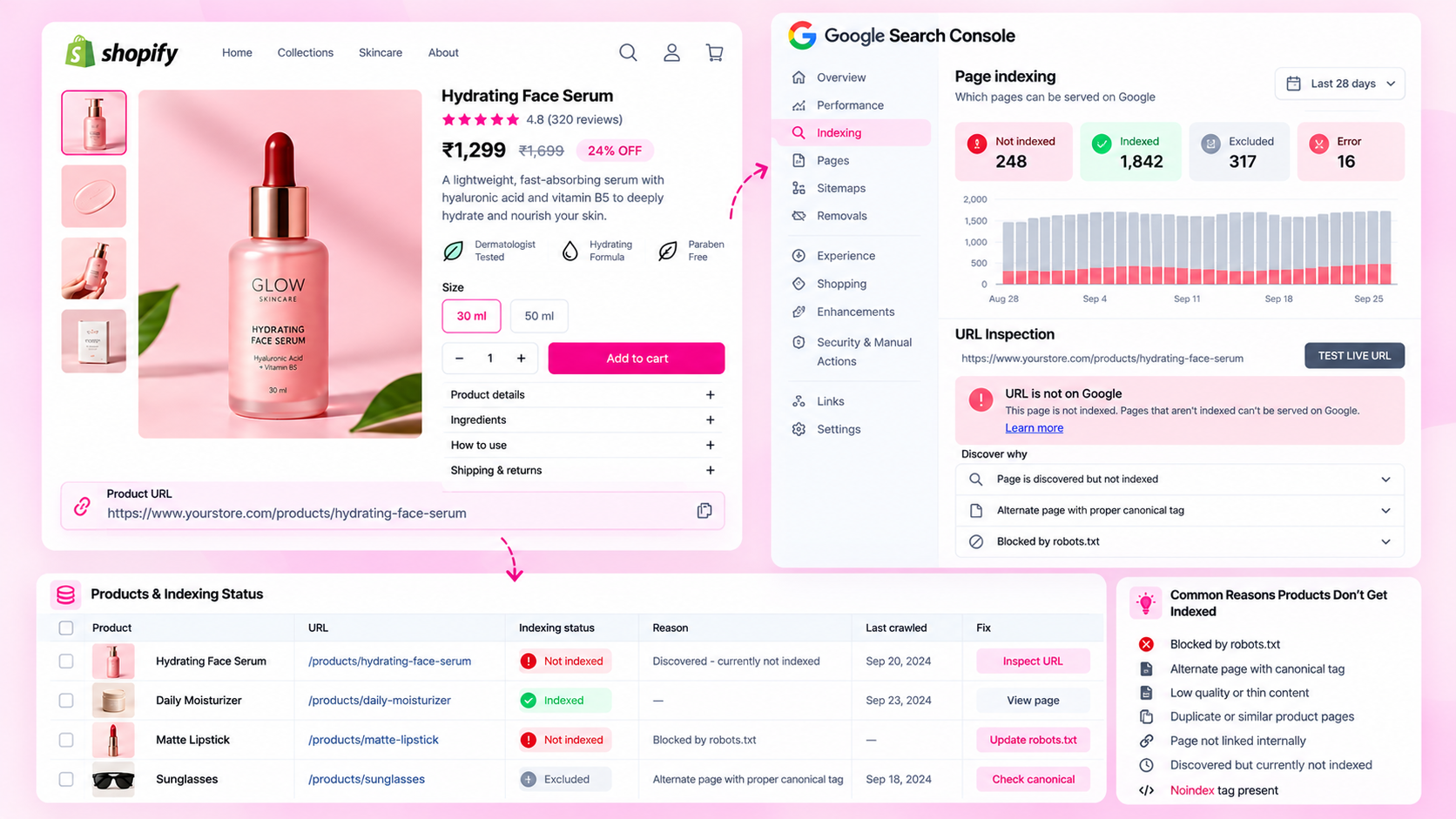
Quick Answer: Why Are Shopify Product Pages Not Indexed?
Common causes include discovery problems (no links to the page), canonicalization to another URL, robots directives blocking indexing, incorrect HTTP status, low-value or duplicate content, and normal processing delays. Use Google Search Console's URL Inspection tool to diagnose the actual status before deciding on a fix.
Understanding the Difference Between Crawling and Indexing
Indexing problems are often confused with ranking problems. Before troubleshooting, clarify what is actually happening:
| Situation | Meaning |
|---|---|
| Page not indexed | Google has not included the page in its index |
| Page indexed but not ranking | Page is in the index but not appearing for your target queries |
| Page indexed under wrong URL | Google selected a different canonical than intended |
| Page indexed, then dropped | Google removed the page after a quality or policy evaluation |
URL Inspection in Search Console tells you whether a URL is indexed, what canonical Google selected, and when it was last crawled. Start there.
Step 1: Check the URL Status in Google Search Console
Open Search Console, navigate to URL Inspection, and enter the exact product URL. The report tells you:
- Coverage status: Indexed, Discovered, Crawled but not indexed, Excluded, etc.
- Google-selected canonical: The URL Google considers the canonical version (may differ from the tag you set)
- Last crawl date: When Google last successfully retrieved the page
- Referring page: A page Google used to discover this URL
If the status shows "Excluded — Duplicate, Google chose different canonical than user," that means Google found the content on another URL and indexed that one instead. If it shows "Crawled — currently not indexed," Google retrieved the page but decided not to index it.
Step 2: Check HTTP Status and Accessibility
Verify the URL returns the response you expect:
https://yourstore.com/products/your-product-handle
- Should return HTTP 200 (not 301, 302, 404, or 500)
- Should be accessible without login
- Should not redirect to a different URL unexpectedly
A redirect chain — where the URL you submitted redirects to a second URL, which redirects to a third — can delay crawling and cause indexing inconsistencies.
Step 3: Review Robots Directives and Canonical Tags
Three things can tell Google not to index a page:
a) Meta robots tag Open the product page and search the source for:
<meta name="robots" content="noindex">
If present, Google will not index the page regardless of other signals. This sometimes appears accidentally from SEO apps with misconfigured settings.
b) X-Robots-Tag header
Some server-side configurations add indexing directives via HTTP headers. Use a tool like curl -I yourstore.com/products/handle to check response headers.
c) Canonical tag pointing elsewhere If the canonical tag points to a collection-filtered URL or a variant URL, Google may index that URL instead of the one you intended. Check the canonical on the rendered page:
<link rel="canonical" href="https://yourstore.com/products/product-handle">
The canonical should reference the product's direct URL, not a collection-path version.
d) Robots.txt
Verify that yourstore.com/robots.txt does not Disallow: /products/ or the specific URL path.
Step 4: Improve Discovery and Internal Links
Google needs to find a page before it can index it. A product with no internal links pointing to it — not in any collection, navigation, sitemap, or related product section — may never be crawled.
| Discovery path | How to check |
|---|---|
| Collection | Is the product assigned to at least one active collection? |
| Navigation | Does any menu link lead to this product or its collection? |
| Sitemap | Does yourstore.com/sitemap.xml include this product URL? |
| Related products | Does any other product page link to this one? |
| Blog posts | Does any content on the site reference and link to this product? |
Adding a product to a collection is typically sufficient for Shopify to include it in the sitemap and make it discoverable.
Step 5: Review Content Quality
Google sometimes crawls a page but chooses not to index it if the content appears to offer little value. Signals that can contribute to this:
- Very thin content: A product with only a title and no description
- Duplicate content: Identical or near-identical copy to other pages on the same domain or elsewhere
- Content that does not reflect the page's purpose: Generic boilerplate applied to many products
This does not mean every product needs 1,000 words of copy. But a product page should clearly describe the item — what it is, what it does, who it is for — with enough specificity to be genuinely useful.
Step 6: Request Reprocessing and Monitor
After fixing a confirmed issue:
- Use URL Inspection → Request Indexing in Search Console to signal that the page is ready
- Wait several days to a week — recrawling is not immediate
- Re-run URL Inspection to check updated status
- Monitor Search Console's Coverage report for patterns across multiple products
Repeated requests do not speed up indexing. Fixing the underlying cause and waiting is more effective than repeatedly submitting the same URL.
Common Scenarios and Likely Causes
| What you see in Search Console | Most likely cause |
|---|---|
| "Discovered — currently not indexed" | Google found the URL but has not crawled it yet (low priority, discovery only via sitemap) |
| "Crawled — currently not indexed" | Page was retrieved but not indexed — check content quality and duplicate content |
| "Duplicate, submitted URL not selected as canonical" | Your submitted URL has a canonical tag pointing elsewhere |
| "Excluded by robots.txt" | Check robots.txt for overly broad disallow rules |
| "Page with redirect" | URL redirects instead of serving the product directly |
| "Not found (404)" | URL returns a 404 — product may be deleted or handle changed |
Frequently Asked Questions
How long does indexing take after fixing the issue?
It varies from days to weeks. Shopify's sitemap is typically re-fetched within a few days, but crawling and indexing individual pages depends on Google's crawl schedule for your site.
Does submitting a sitemap guarantee indexing?
No. The sitemap helps Google discover URLs, but Google decides independently whether to crawl and index each one based on its own quality and relevance assessment.
Should every product variant have its own indexed URL?
Not necessarily. Shopify uses canonical tags to consolidate variant URLs back to the parent product URL by default. This is generally appropriate unless individual variants have genuinely distinct search intent.
Can a product rank without being indexed?
A page needs to be indexed in Google's index to appear as a standard organic search result. An unindexed page will not rank.
Related Articles
- Shopify Product Variants and SEO: Duplicate URLs and Canonical Tags
- Shopify Product Schema Errors: How to Find and Fix Missing JSON-LD
- How to Audit 1,000 Shopify Product Pages Without Checking Them Manually