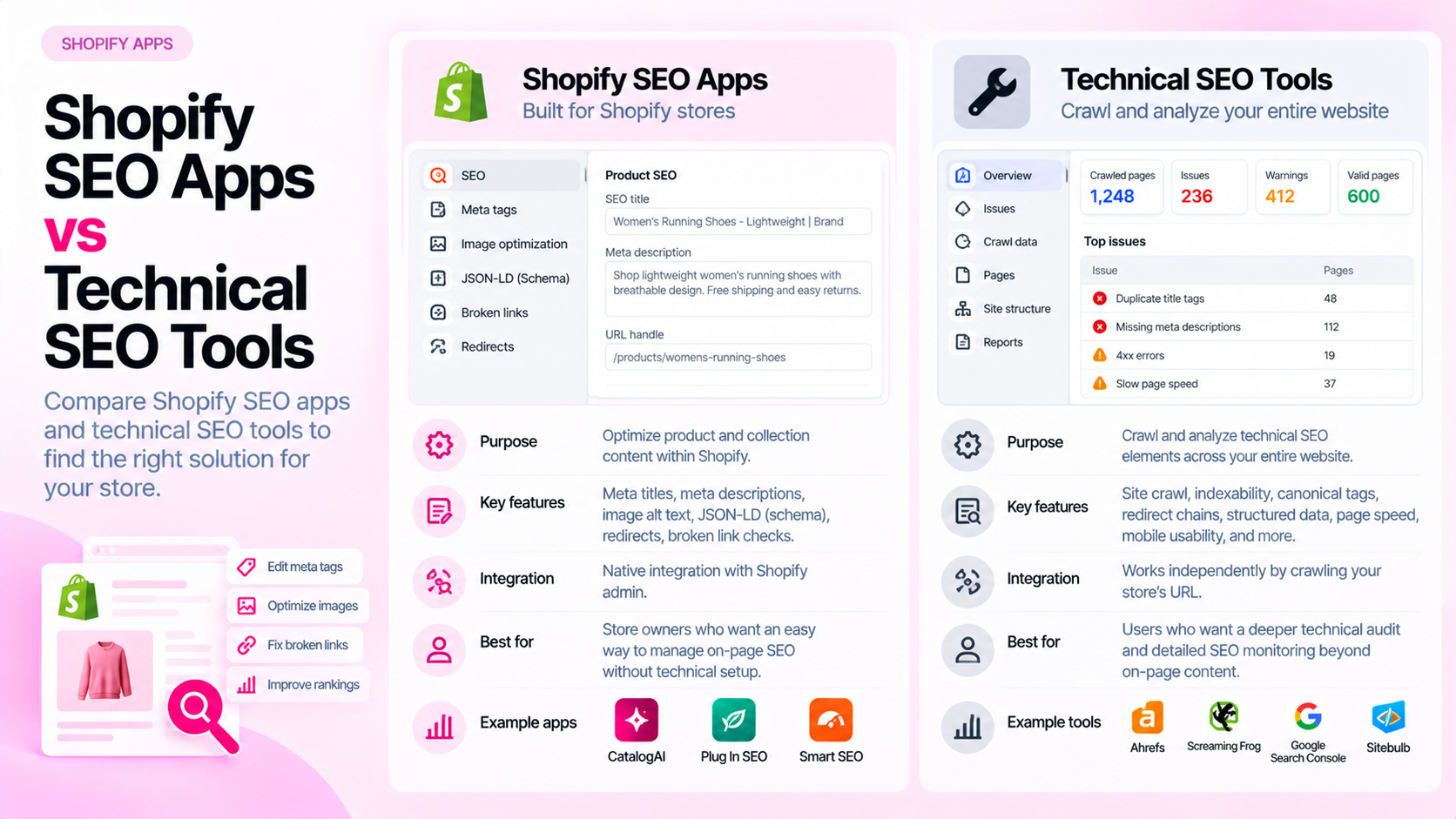
Quick Answer: What Is the Difference Between Shopify SEO Apps and Technical Audit Tools?
Shopify SEO apps typically help you manage and optimise metadata, redirects, image compression, and structured data through an ongoing interface integrated into Shopify Admin. Technical audit tools — including crawler-based tools and catalog audit tools like CatalogAI — inspect your live site or product data and report on what needs fixing. The two are complementary: apps help you implement, auditing tools tell you what to implement and verify the result.
What Shopify SEO Apps Typically Do
Shopify SEO apps are designed to make common optimisation tasks easier to manage without custom development. Depending on the app, common capabilities include:
| Capability | What it does |
|---|---|
| Metadata management | Edit or bulk-update SEO titles and meta descriptions from within the app |
| Structured data injection | Add or override Product JSON-LD, breadcrumbs, or other schema types |
| Redirect management | Create and manage 301 redirects when URLs change |
| Image optimisation | Compress images or add alt text in bulk |
| Sitemap management | Customise which pages appear in the sitemap |
| Broken link detection | Surface internal links pointing to removed pages |
These apps operate within Shopify Admin and are generally designed for ongoing management rather than one-time auditing. You use them to make changes — they do not tell you what changes to make based on a systematic inspection of your catalog.
What Technical SEO Audit Tools Do
Technical audit tools take a different approach: they inspect rather than manage. They read your site or product data and surface issues.
General-purpose website crawlers (like Screaming Frog or Sitebulb) crawl your entire site, follow links, and report on:
- HTTP status codes (404s, redirect chains, 500 errors)
- Page titles, meta descriptions, and heading structure
- Canonical tags and hreflang
- Page speed signals
- Internal link graph
These tools treat product pages like any other page. They do not have built-in awareness of what fields a Shopify product page should have.
Product catalog audit tools (like CatalogAI) focus specifically on product data completeness and accuracy:
- Which products are missing required field values (descriptions, metafields, alt text)
- Where Product JSON-LD is missing or invalid
- Where metadata is absent or duplicated across products
- Which product pages have accessibility or crawlability issues
Where They Overlap — and Where They Do Not
| Feature | Shopify SEO apps | General crawler | Product catalog audit |
|---|---|---|---|
| Metadata editing | ✅ Yes | ❌ No | ❌ No |
| Structured data injection | ✅ Some apps | ❌ No | ❌ No |
| Redirect management | ✅ Yes | ❌ No | ❌ No |
| Audit across all product pages | ⚠️ Limited | ✅ Yes | ✅ Yes |
| Product field completeness | ❌ No | ❌ No | ✅ Yes |
| Metafield population checks | ❌ No | ❌ No | ✅ Yes |
| Structured data validation | ⚠️ Some apps | ⚠️ Some tools | ✅ Yes |
| Variant-level data checks | ❌ No | ❌ No | ✅ Yes |
| HTTP status and crawlability | ❌ No | ✅ Yes | ✅ Yes |
A Real-World Scenario: Structured Data on Shopify
A common situation illustrates how these tools work together:
- You install a Shopify SEO app that says it adds Product JSON-LD to your store.
- Three months later, a theme update changes how the app hooks into the template. Some product pages now have duplicate JSON-LD blocks (from the theme and the app). Others have no JSON-LD at all.
- The SEO app dashboard still shows "JSON-LD enabled" — it does not inspect live pages.
- A product catalog audit tool like CatalogAI or a crawl-based validator checks the live rendered pages and surfaces the affected products.
- You fix the theme conflict and re-verify.
In this scenario, the SEO app was the implementation layer; the audit tool was the verification layer. You needed both.
How to Decide What Your Store Needs
Start with an audit, not an app. If you do not know the extent of your current issues, a catalog audit is the logical first step. It tells you what needs attention across your product catalog — without requiring you to configure an app upfront.
Then use apps to implement fixes at scale. If an audit reveals that 400 products are missing meta descriptions, a Shopify SEO app with bulk editing can apply corrections efficiently. If JSON-LD is broken, an app or theme fix resolves it.
Re-audit after making changes. After implementing fixes — whether through an app, a theme change, or manual edits — re-run the audit to confirm the issues are resolved. Apps that say they handle something do not always confirm the live result.
Where Catalog Auditing Fits
A catalog audit tool occupies a distinct position:
- It is not a management interface (you cannot edit product data directly in it)
- It is not a general crawler (it focuses on product-level data, not site-wide architecture)
- It is specifically designed to answer: "What is wrong with my product data, and which products are affected?"
For Shopify stores with more than 50 products and any degree of catalog complexity (variants, metafields, structured data), a periodic catalog audit is useful regardless of which SEO app you use.
Frequently Asked Questions
If I use a good Shopify SEO app, do I still need to audit?
Yes. SEO apps manage implementation; auditing verifies the live result. Apps can malfunction after theme updates, produce incorrect output for specific product types, or miss edge cases in large catalogs. Regular auditing catches these gaps.
Can one app do both SEO management and auditing?
Some apps offer partial overlap — for example, surfacing missing meta descriptions alongside editing them. But the depth of auditing in most SEO management apps is limited. A dedicated catalog audit tool typically provides more complete product-level coverage.
How often should I audit if I have an SEO app installed?
At minimum after every theme update, app change, or bulk catalog modification. Quarterly audits are a reasonable ongoing cadence for most stores. Shopify SEO apps help you manage and implement SEO elements within the Shopify platform — metadata, redirects, structured data templates, image compression. Technical audit tools inspect your live pages and identify problems with how those elements are rendered and functioning. Their features overlap significantly, so compare actual checks and workflow fit rather than category labels.
What Shopify SEO Apps Commonly Help With
Most Shopify SEO apps are productivity tools for managing SEO elements at scale within the Shopify platform. Common capabilities:
- Bulk metadata editing: Update meta titles and meta descriptions across multiple products or collections from a single interface
- Redirect management: Create, import, and manage 301 redirects when URLs change
- Structured data templates: Auto-generate Product JSON-LD based on product fields, without requiring custom theme code
- Image optimization: Compress images and apply alt text in bulk
- Broken link detection: Surface internal 404s across the storefront
- Sitemap management: Customize which URLs appear in the XML sitemap
The key characteristic of SEO apps is that they operate within Shopify — they help you do SEO tasks inside the platform more efficiently. They typically do not crawl your live storefront as an external party would.
What Technical Audit Tools Commonly Check
Technical audit tools — whether Shopify-specific or general-purpose crawlers — inspect what's actually happening on your live site. They check:
- HTTP status codes: Which URLs return 200, 301, 404, or 500?
- Canonical tags: Are they present? Do they point to the intended URL?
- Robots directives: Are any pages accidentally blocked from indexing?
- Page speed: How long does the page take to load?
- Internal link structure: Which pages are linked from where? Which are orphaned?
- Broken links: Which outgoing links return errors?
- Structured data validation: Is the JSON-LD valid? Does it pass Google's parsing requirements?
- Duplicate content: Which pages show substantially identical content under multiple URLs?
General-purpose crawlers (like Screaming Frog, Sitebulb, or Ahrefs Site Audit) treat your store as a website and apply the same checks they would to any URL. They're powerful for site-level diagnosis.
Where Catalog Auditing Fits
Catalog-specific audit tools focus on a distinct layer: the completeness and consistency of product data across the catalog.
| Tool type | Primary focus |
|---|---|
| Shopify SEO app | Implementing SEO elements (metadata, redirects, structured data) |
| Technical crawler | Site-level signals (status codes, crawlability, internal links, speed) |
| Catalog audit tool | Product-level data completeness (missing fields, inconsistent attributes, alt text) |
Catalog auditing addresses questions like: Which products are missing a meta description? Which product images have no alt text? Which products in the "Apparel" collection are missing size attribute values? Which variants have an incorrect availability status?
These questions require access to product-level data across the entire catalog — not just the signals visible to an external crawler, and not just the metadata editing workflow of an SEO app.
How to Choose the Right Combination
Define your problems first:
- If you need to fix metadata at scale and manage redirects → an SEO app covers this
- If you need to diagnose site-level crawlability issues, broken links, or speed problems → a technical crawler covers this
- If you need to find and fix missing product fields, inconsistent attributes, and image alt text across hundreds of products → a catalog audit tool covers this
These are not mutually exclusive. A growing Shopify store commonly uses at least two: a catalog tool for ongoing product data quality, and a crawler or SEO app for site-level maintenance.
The mistake is assuming that one tool type covers all three problem categories when in practice each has a distinct scope.
Frequently Asked Questions
Can one app do everything? Rarely in practice. Most tools are deeper in one category than another. Evaluate based on the specific checks you need, not on whether it's marketed as an "all-in-one SEO solution."
Do SEO apps guarantee rankings? No. Apps help you implement SEO elements correctly and manage them at scale. Rankings depend on content quality, relevance, link profile, user signals, and competitive factors that apps don't control.
Should product catalog audits and site-level audits be combined? Often yes, but they don't need to be run with the same tool. Run catalog audits regularly (weekly or monthly) to maintain product data quality. Run site crawls periodically or after significant changes to the theme, navigation, or URL structure.
What's the most common gap in Shopify SEO tooling? Product-level catalog completeness. Most stores have a solution for managing meta titles and descriptions, and most run a site crawler occasionally. Fewer have a systematic, ongoing process for checking whether every product has complete, accurate, consistent data across fields — which is where catalog auditing fills the gap.
Related Articles
- Shopify Product SEO Audit Tools: What to Compare Before Choosing One
- Manual Shopify Catalog Audits vs Automated Audits: When Each Makes Sense
- Shopify Product Schema Errors: How to Find and Fix Missing JSON-LD
Audit your Shopify product catalog with CatalogAI | Install CatalogAI on Shopify
- Manual Shopify Catalog Audits vs Automated Audits
- How to Audit 1,000 Shopify Product Pages Without Checking Them Manually