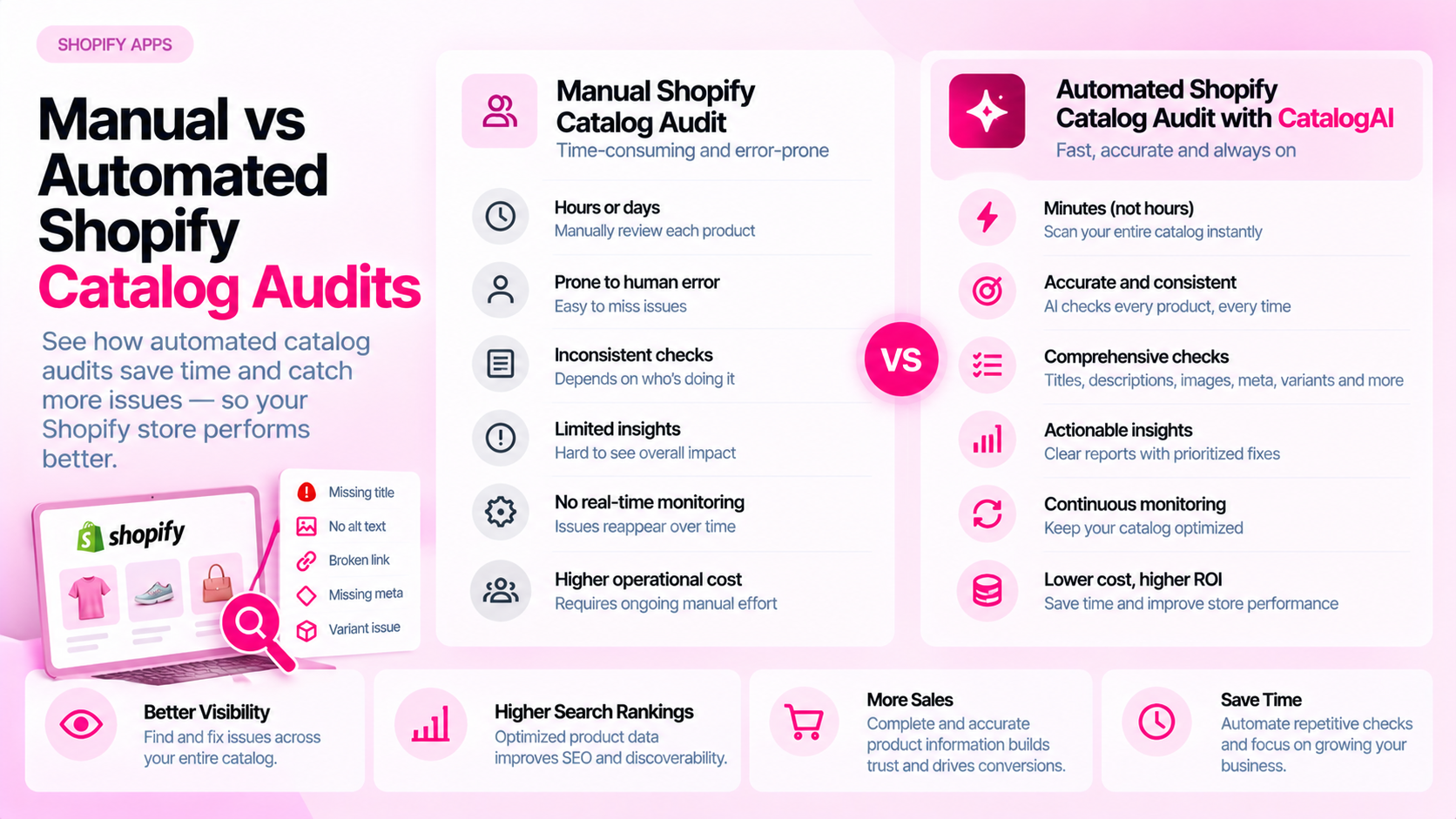
Quick Answer: Is a Manual or Automated Shopify Catalog Audit Better?
Manual inspection provides context and is useful for investigating individual pages. Automation can apply repeatable checks across larger catalogs. Most growing Shopify stores benefit from combining automated detection with manual validation and remediation — not choosing one or the other.
Where Manual Audits Work Well
Manual review is the right tool for nuanced decisions that require judgment:
- Content quality assessment: Does the product description accurately reflect the item, or is it generic copy pasted across a category?
- Customer experience review: Is the page actually useful for a shopper making a purchase decision, or just technically complete?
- Contextual investigation: An automated tool flags a "missing" specification — is that actually missing, or intentionally omitted for that product type?
- Design and presentation: Does the product image match the selected variant? Is the page readable on mobile?
For a store with 50–100 products, a thorough manual review of each listing is practical and often the most direct approach.
Where Automation Helps
Automated checks become essential once your catalog exceeds a few hundred products. A tool can consistently apply the same rules across every SKU, every day, without fatigue:
- Flag products where the meta description field is empty
- Identify every image with no alt text value set
- Find product pages with no
<link rel="canonical">tag or a canonical pointing to the wrong URL - Detect products missing required attributes for a specific category (e.g., no size guide for apparel)
- Spot titles under a minimum character threshold or over a maximum
The advantage is coverage — a team of three people cannot manually review 2,000 product pages in a single sprint. Automation surfaces the issues; people decide what to fix.
Compare Coverage, Consistency, and Depth
| Dimension | Manual | Automated |
|---|---|---|
| Scale | Slow; practical for small catalogs | Fast; works across any catalog size |
| Consistency | Variable; depends on reviewer | Consistent; same rules applied every run |
| Context | High; reviewer can apply judgment | Low; tools flag by rule, not meaning |
| False positives | Low for experienced reviewers | Can be significant; requires review |
| Ongoing cadence | Hard to maintain at scale | Easy to schedule and repeat |
| Cost per product | High (staff time) | Low after setup |
Before acting on any automated finding, verify a sample manually. A tool may flag a missing alt text value that turns out to be a decorative image where empty alt text is correct. Bulk-fixing without verification can create new problems.
Estimate the Operational Cost
When deciding how much to invest in auditing, consider:
- Staff time: How many hours does your team currently spend finding and correcting catalog issues per month?
- Frequency: A 200-product catalog updated weekly needs more frequent checking than a 50-product catalog updated quarterly.
- Rework cost: How often do errors get published and then need correction after a customer complaint or feed rejection?
- Tool cost vs. time saved: A tool that costs $X/month is worth evaluating against the hours it replaces or the errors it catches before they cause downstream problems.
Use your own measured data rather than assuming generic savings. The right answer depends entirely on your catalog size, update frequency, and team structure.
Use a Hybrid Workflow
The most practical approach for most stores:
- Run automated checks on a regular schedule (weekly or after major catalog updates)
- Group findings by issue type — missing alt text, empty meta descriptions, broken canonical tags — so similar fixes can be batched
- Manually validate ambiguous cases before making bulk changes
- Assign fixes to the right owner — content team for descriptions, technical team for structured data
- Rescan after corrections to confirm the issue is resolved, not just closed in a spreadsheet
This approach gives you the scale of automation without the risk of acting blindly on every flagged item.
Frequently Asked Questions
Can automation replace an SEO specialist? Not entirely. Automated tools are good at flagging predefined rules; an experienced practitioner is needed to interpret findings, set priorities, and decide what actually matters for a given store.
Are automated findings always accurate? No. Rules-based tools produce false positives. A missing field may be intentional. A canonical mismatch may be by design. Always validate a sample before bulk-fixing.
When is manual review sufficient? Manual review is practical for small catalogs (under 100 products), for nuanced quality assessment, and for investigating specific issues identified by automated tools. It is not scalable as the sole method for ongoing monitoring of a large catalog.
How often should audits run? Match the frequency to how often your catalog changes. Stores that import new products weekly benefit from weekly automated scans. Stores with stable catalogs may need only monthly reviews.
Related Articles
- Shopify Product SEO Audit Tools: What to Compare Before Choosing One
- Shopify SEO Apps vs Technical SEO Auditing Tools: What's the Difference?
- How to Prioritize Product SEO Fixes Across a Large Shopify Catalog