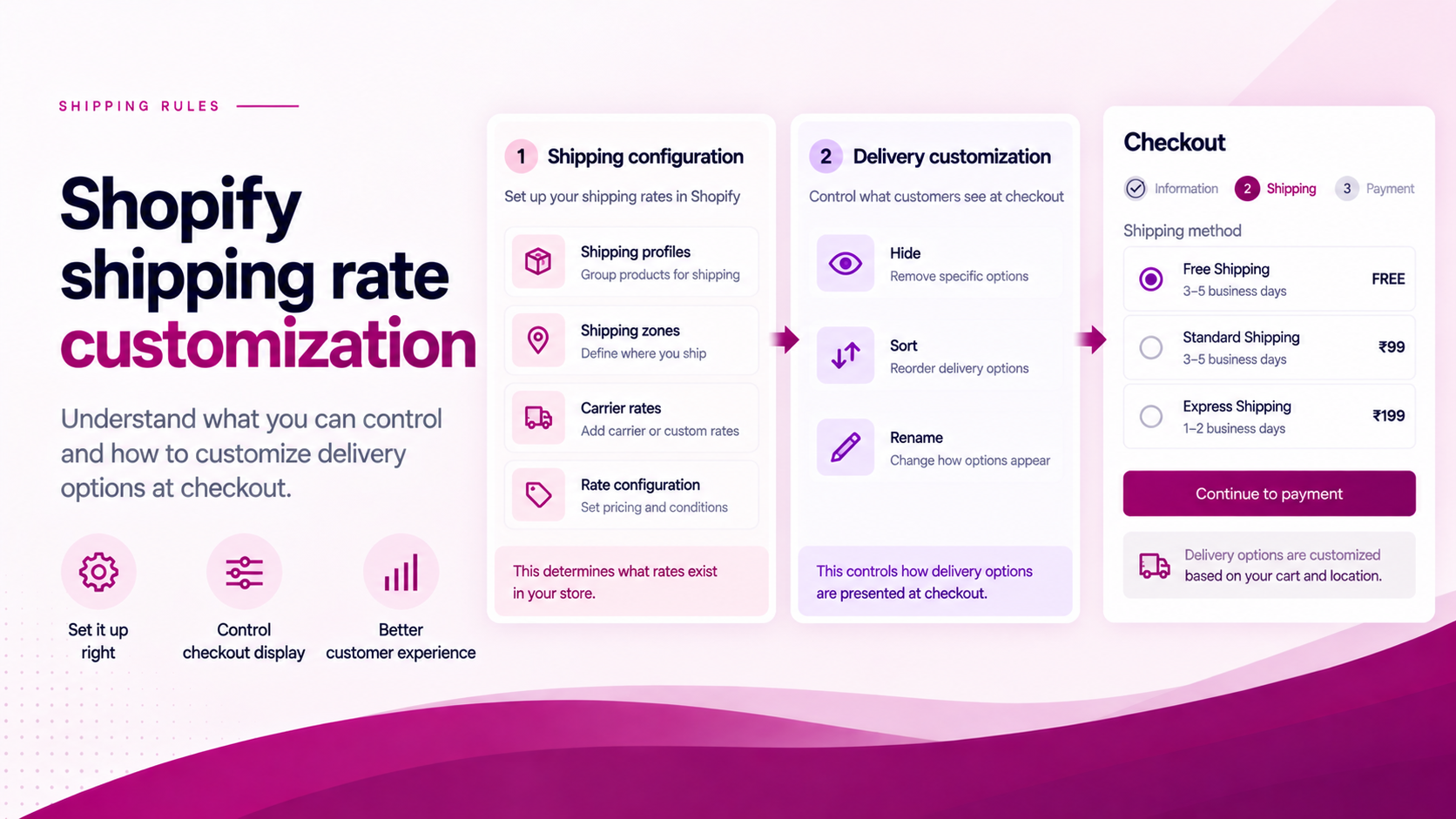
"Can I customize my Shopify shipping rates?" is actually several different questions.
Do you want to change the price? Change the carrier? Change the name? Hide a method? Change its position? Apply a rule based on the cart? Those are different problems — and they sit at different layers of Shopify's shipping stack.
Understanding which layer you need to change is the most useful first step.
Layer 1: Rate Configuration
This layer determines what delivery services and rates are available to customers.
Rate configuration happens in Shopify's shipping settings, carrier integrations, shipping profiles and third-party shipping management tools. Changes here affect:
- Which carrier services are active
- What prices are charged
- Which geographic zones a rate applies to
- Which products are associated with which shipping profile
If the underlying rate is wrong — wrong price, wrong carrier, wrong zone — this is the layer to fix.
Layer 2: Delivery Customization
Shopify's Delivery Customization Function API provides a checkout-level layer for renaming, sorting and hiding delivery options. This is where ShipSort operates.
Changes at this layer do not change the carrier or the rate price. They change the presentation of available delivery options at checkout. For example:
- "Hide Express when the address is a PO Box."
- "Move Free Shipping to a preferred position."
- "Rename Standard Delivery to a clearer customer-facing label."
The rate still exists. The rule controls whether and how the customer sees it.
Why the Distinction Matters
A merchant may describe the problem as: "I want to change shipping."
But the actual requirement may be: "I already have the right rates. I just want to control how customers see them."
That is a delivery-customization problem — not a rate-configuration problem. Solving it at the wrong layer creates unnecessary complexity. Changing a carrier configuration when what you need is a conditional rule adds costs without addressing the checkout behaviour.
What ShipSort Is Designed For
ShipSort focuses on delivery-option presentation:
- Drag-and-drop ordering — control the sequence customers see options in
- Conditional hiding — remove options from view based on cart, address, product or customer conditions
- Conditional prioritisation — surface a preferred option first when a condition is met
- Dynamic naming — relabel a delivery option to something clearer without changing the underlying rate
ShipSort does not replace your carrier configuration. It operates on the options that your carrier configuration makes available.
Check the Limitation Before Promising a Solution
Shopify documents that delivery customization can operate on delivery options, but compatibility depends on the checkout surface and the source of the delivery rate.
For example, Shopify notes a limitation around detecting PO Box addresses when the store uses Shopify's built-in shipping rates, because the required address data may not be available to the Function in that configuration.
This is why every implementation should be validated against the merchant's actual setup — not just against general documentation.
The correct question is not: "Can Shopify customize shipping?"
It is: "Which layer of shipping behaviour do you need to change — and does your current setup support it?"
Related Articles
- How to Create Conditional Shipping Rules in Shopify
- Shopify Shipping Profiles vs Conditional Shipping Rules
- How to Reorder Shipping Methods in Shopify
- How to Rename Shopify Shipping Methods