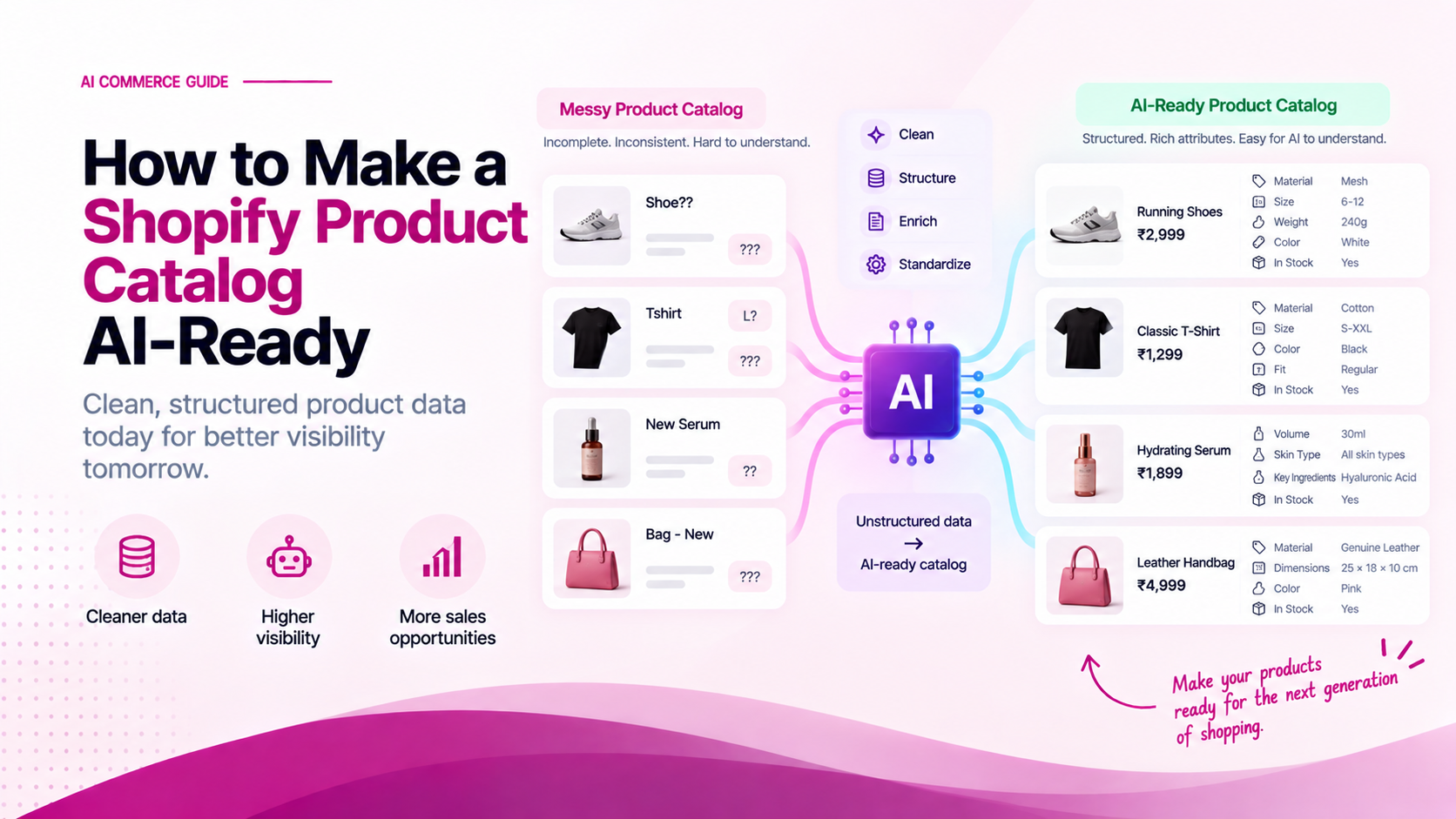
Search engines taught e-commerce merchants to optimize for keywords and search intent.
AI-assisted shopping introduces a fundamental shift:
Can a machine accurately understand what your product is, who it is built for, its technical specifications, and why it fits a specific customer's query?
When a customer asks an AI assistant for a product recommendation, the assistant does not just look for keyword matches. It evaluates structured attributes, compatibility rules, customer trust signals, and variant relationships.
If your catalog relies on vague marketing descriptions rather than explicit structured facts, AI agents will either guess—leading to inaccurate recommendations—or omit your products entirely.
Marketing Copy vs. AI-Ready Product Data
Traditional product descriptions focus on persuasive marketing language. AI shopping systems require concrete, machine-readable facts.
| Attribute Type | Traditional Marketing Description | AI-Ready Structured Attribute |
|---|---|---|
| Apparel Material | "Crafted from insanely soft luxury fabric" | 100% Organic Ring-Spun Cotton (180 GSM) |
| Footwear Fit | "Designed for effortless comfort on the go" | Neutral Arch, Wide Toe Box, True-to-Size |
| Electronics | "Blazing fast next-gen connectivity" | Bluetooth 5.3, USB-C PD (65W Input) |
| Skincare | "Rejuvenating formula for glowing skin" | 10% Niacinamide, Fragrance-Free, Non-Comedogenic |
Marketing copy connects with human emotions, but explicit attributes provide the machine-readable facts required for direct comparison. Both can coexist on the page, but structured attributes must be explicitly defined.
1. Define Standard Product Taxonomy in Shopify
Shopify uses a standard Product Taxonomy system that automatically maps your products to standardized category trees. Ensuring your products use Shopify's official category hierarchy is the first step toward machine readability.
How to set up Standard Category Attributes in Shopify Admin:
- Go to Shopify Admin > Products and select a SKU.
- Under Product Category, choose the precise taxonomy path (e.g.,
Apparel & Accessories > Clothing > Shirts & Tops). - Scroll to Category Attributes. Shopify will present standard fields specific to that category (such as Color, Size, Age Group, Target Gender, Material).
- Fill out every category attribute explicitly instead of relying on custom tags.
Shopify Taxonomy Path Example:
Apparel & Accessories > Shoes > Running Shoes
├── Gender: Unisex
├── Age Group: Adult
├── Activity: Road Running
└── Cushioning: Moderate
2. Set Up Shopify Custom Data (Metafields)
For attributes not covered by standard categories, use Shopify Metafields (Settings > Custom Data > Products) to store key data points as structured data types.
Recommended Metafield Definitions for AI Commerce:
| Metafield Name | Namespace & Key | Type | Example Value |
|---|---|---|---|
| Primary Material | custom.primary_material |
Single line text | 100% Merino Wool |
| Care Instructions | custom.care_instructions |
List of single line text | ["Machine Wash Cold", "Tumble Dry Low"] |
| Compatibility | custom.compatibility_list |
List of single line text | ["iPhone 15 Pro", "iPhone 15 Pro Max"] |
| Dimensions | custom.dimensions_cm |
Single line text | 30cm x 15cm x 45cm |
| Return Period | custom.return_window_days |
Integer | 30 |
3. Implement Full Product JSON-LD Schema
Structured data using schema.org markup is one of the most reliable ways for search engines and AI web crawlers to parse your product information without scraping HTML.
Add the following JSON-LD snippet inside your Shopify theme's snippets/schema-product.liquid or sections/main-product.liquid:
{
  "@context": "https://schema.org/",
  "@type": "Product",
  "name": "{{ product.title | escape }}",
  "image": [
    "https:{{ product.featured_image | image_url: width: 1200 }}"
  ],
  "description": "{{ product.description | strip_html | truncatewords: 50 | escape }}",
  "sku": "{{ product.selected_or_first_available_variant.sku }}",
  "mpn": "{{ product.selected_or_first_available_variant.barcode }}",
  "brand": {
    "@type": "Brand",
    "name": "{{ product.vendor | escape }}"
  },
  "material": "{{ product.metafields.custom.primary_material.value | escape }}",
  "offers": {
    "@type": "Offer",
    "url": "{{ shop.url }}{{ product.url }}",
    "priceCurrency": "{{ cart.currency.iso_code }}",
    "price": "{{ product.selected_or_first_available_variant.price | divided_by: 100.0 }}",
    "itemCondition": "https://schema.org/NewCondition",
    "availability": "{% if product.available %}https://schema.org/InStock{% else %}https://schema.org/OutOfStock{% endif %}",
    "seller": {
      "@type": "Organization",
      "name": "{{ shop.name | escape }}"
    }
  }
}
4. Make Variant Data Unambiguous
If a product has multiple variants (such as 5 sizes and 4 colors), ensure each variant has:
- A unique, dedicated SKU code
- A specific Barcode / GTIN
- An explicit Variant Image assigned in Shopify Admin
- Individual Pricing and Inventory Counts
Ambiguous variants force AI systems to guess whether a specific option is in stock or what its exact specifications are.
5. Expose Operational & Trust Signals
Product selection is not only about features—it is about buyer confidence. AI agents look for operational assurances before making recommendations:
- Delivery Windows: State typical transit times clearly (e.g.,
"Dispatched in 24 hours | 2–4 business days delivery"). - Return Policies: Make your return window and terms explicit (e.g.,
"30-day hassle-free returns"). - Warranty Terms: Include warranty duration in metafields and structured specifications.
- Customer Ratings: Integrate verified review apps (e.g., Judge.me, Loox, Okendo) that output clean schema markup for
aggregateRating.
Merchant Action Checklist
Use this 8-step checklist to verify that your Shopify catalog is AI-ready:
- All products are assigned to standard Shopify Taxonomy categories.
- Category-specific attributes (color, size, material, gender) are completed in Shopify Admin.
- Custom product metafields are created for technical or category specs.
- JSON-LD schema is active and validated using Schema.org validator tools.
- Product titles include product type, primary attribute, and brand.
- Every variant has a unique SKU, GTIN/barcode, and specific image.
- Shipping, return policy, and warranty data are explicitly stated on every product page.
- Verified customer reviews are rendered with valid structured data.
Related Articles
- What Product Data Do AI Shopping Agents Need?
- How to Optimize Shopify Product Pages for AI Shopping
- How to Check Whether AI Can Understand Your Shopify Products